3주차 라이브 특강
* 질문
{ 트러블 슈팅 }
- 생각을 해야함 (즉 공부는 생각을 해야함)
이것을 왜쓴는지 나는 왜 안되는지 등
3주차 강의
| 쿠키 |
| 세션 |
| 세션 ID |
3주차 1강
지난 주차 복습
SQL은 DB언어이다.
강의 에서 배운 것은 Select와 insert 그리고 페이지 만들면서 알게되는 UPdate를 알게 됨
php에서 출력하는 방법은
<?php
echo $name;?> ?>(이 방법과)
<?=$name?> (이 방법이 있음)
오늘은 로그인 과정에 배울 것이다.
로그인 = 인증
- (나중에) OTP 번호 인증 우회 취약점
로그인 : 그사람이 맞는지 확인 하는 작업
식별 / 인증
식별은 수많은 데이터 중에 특정 데이터를 후레쉬로 비추는 작업, 즉 수많은데이터 중 나의 데이터를 찾는것식별 정보는 유닉크 해야 하며 정보로 사용할 경우 유닉해야한다. 중복 되는 값이 되면 안된다.
식별 정보로 사용할 데이터에는 항상 pk프라이머리 키를 등록해야 한다.
PK는 절대로 중복할 수 없는 키임
식별은 수 많은 사람들 중에서 특정한 사람을 찝어내는 것임
고유 식별 정보 : 이 정보만 가지고 우리나라에 서 그 사람을 특정 할 수 있는 정보 즉
(EX 주민등록 번호0
식별정보는 노출 되도 상관없다. (식별 정보 : ID, 전화번호, email 등)
BUT 고유식별 정보는 노출 되면 위험하다.
인증 : 그 사람 본인이 맞는지 확인하는 작업이다. 인증 정보를 이용해서 인증을 함
(EX: 비밀 번호)
찝어 내기만 하는 게아니라 그사람이 만는지 인증하는 것이 인증임
로그인 시
select * from member where id='normaltic' (normaltic id를 식별 한 SQL 문임
이사람이 normaltic가 맞는지 비밀번호를 비교함 → 이과정은 인증임
인증에서 맞으면 통과 틀리면 실패임 이렇게 판단하는 것이 로그인이라는 로직임
* 인증정보는 유출되면 위험하다.
로그인 할 때는 이 식별과 인증이 동시에 일어남
3주차 2강
식별과 인증
로직
로그인 로직 케이스
(1) 식별과 인증을 동시에 하는 케이스 강의는 식별 / 인증 동시 라고 함
이것은 DB질의를 한번에 수행해서 로그인 구현 하는 것이다.
지금부터 사용하는 코드는 수도코드임 (가짜 코드, 대략 적인 코드임)
$sql = "select * from member where"
$sql .= "id='user_id and pass='$user_pass' '"
id와 비밀번호 조건을 SQL 조건에 한번에 넣는 것임
$ret = sql.exexute();
if($ret) {
// 로그인 성공
}else{
//로그인 실패
}
이런 식으로 만드는 것이 식별/ 인증 동시임
sql에서 아이디와 비번이 일치하는지 아는 방법
select * from member where user_id='normaltic' and user_pass='1234' 이렇게 해주면 된다.
식별 / 인증 분리하는 로직
sql =
select * from membrt where if='______' (식별.인증 동시방법)
sql=
select pass from member where id='_____' 나
sql =
select * from member where id='_____' (이렇게 전체를 가져와서 식별을 따로 하고 dp pass라고 해서 이 sql의 결과값을 가져와 하는 방법이 있음)
$db_pass = sql.ret['[pass'] (그리고 if문을 아래에 작성함)
if($db_pass == $user_pass){
// 로그인 성공
}else{
// 로그인 실패
}
(+) HASH (1방향 함수 one way) 알고리즘
평문을 알 수 없다
로그인
유지
3주차 과제
[1] 복습
- 로그인 로직 이해 (식별/ 인증)
[2] 지난 과제 못한 것 하기 (특별 과제 제외)
[3] 로그인 페이지 (로직 4개)
- 식별 / 인증 동시
-식별 / 인증 분리
- 식별 / 인증 동시 (wit HASH)
- 식별 / 인증 분리 (wit HASH)
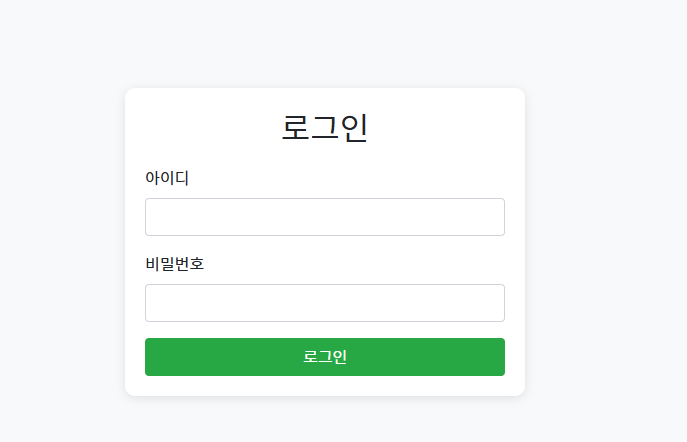
식별 / 인증 동시 ↓ 코드
<!DOCTYPE html>
<html lang="ko">
<head>
    <meta charset="UTF-8">
    <meta name="viewport" content="width=device-width, initial-scale=1.0">
    <link href="https://stackpath.bootstrapcdn.com/bootstrap/4.5.2/css/bootstrap.min.css" rel="stylesheet">
    <title>로그인 페이지</title>
    <style>
        body {
            background-color: #f8f9fa;
        }
        .login-container {
            max-width: 400px;
            margin: 100px auto;
            padding: 20px;
            background: white;
            border-radius: 10px;
            box-shadow: 0 2px 10px rgba(0, 0, 0, 0.1);
        }
        h2 {
            margin-bottom: 20px;
        }
        .btn-primary {
            background-color: #28a745;
            border-color: #28a745;
        }
    </style>
</head>
<body>
    <div class="login-container">
        <h2 class="text-center">로그인</h2>
        <form action="login.php" method="POST">
            <div class="form-group">
                <label for="username">아이디</label>
                <input type="text" class="form-control" id="username" name="username" required>
            </div>
            <div class="form-group">
                <label for="password">비밀번호</label>
                <input type="password" class="form-control" id="password" name="password" required>
            </div>
            <button type="submit" class="btn btn-primary btn-block">로그인</button>
        </form>
    </div>
</body>
</html>
login.php 코드 ↓
<?php
include 'db_connect.php'; // 데이터베이스 연결

if ($_SERVER['REQUEST_METHOD'] == 'POST') {
    $username = $_POST['username'];
    $password = $_POST['password'];

    // 사용자 정보 확인 쿼리
    $stmt = $conn->prepare("SELECT password FROM users WHERE username = ?");
    $stmt->bind_param("s", $username);
    $stmt->execute();
    $stmt->store_result();

    if ($stmt->num_rows > 0) {
        $stmt->bind_result($hashed_password);
        $stmt->fetch();

        // 비밀번호 검증
        if (password_verify($password, $hashed_password)) {
            echo "로그인 성공!";
        } else {
            echo "비밀번호가 일치하지 않습니다.";
        }
    } else {
        echo "아이디가 존재하지 않습니다.";
    }

    $stmt->close();
    $conn->close();
}
?>
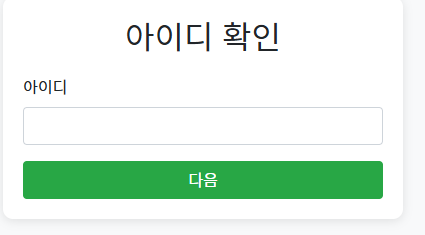
PHP와 HTML, CSS, JavaScript로 구현한 식별과 인증을 분리하여 처리하는 로그인 페이지
<!DOCTYPE html>
<html lang="ko">
<head>
    <meta charset="UTF-8">
    <meta name="viewport" content="width=device-width, initial-scale=1.0">
    <link href="https://stackpath.bootstrapcdn.com/bootstrap/4.5.2/css/bootstrap.min.css" rel="stylesheet">
    <title>아이디 확인</title>
    <style>
        body {
            background-color: #f8f9fa;
        }
        .login-container {
            max-width: 400px;
            margin: 100px auto;
            padding: 20px;
            background: white;
            border-radius: 10px;
            box-shadow: 0 2px 10px rgba(0, 0, 0, 0.1);
        }
        h2 {
            margin-bottom: 20px;
        }
        .btn-primary {
            background-color: #28a745;
            border-color: #28a745;
        }
    </style>
</head>
<body>
    <div class="login-container">
        <h2 class="text-center">아이디 확인</h2>
        <form action="identify.php" method="POST">
            <div class="form-group">
                <label for="username">아이디</label>
                <input type="text" class="form-control" id="username" name="username" required>
            </div>
            <button type="submit" class="btn btn-primary btn-block">다음</button>
        </form>
    </div>
</body>
</html>

    <div class="login-container">
        <h2 class="text-center">아이디 확인</h2>
        <form action="identify.php" method="POST">
            <div class="form-group">
                <label for="username">아이디</label>
                <input type="text" class="form-control" id="username" name="username" required>
            </div>
            <button type="submit" class="btn btn-primary btn-block">다음</button>
        </form>
    </div>
</body>
</html>
<!DOCTYPE html>
<html lang="ko">
<head>
    <meta charset="UTF-8">
    <meta name="viewport" content="width=device-width, initial-scale=1.0">
    <link href="https://stackpath.bootstrapcdn.com/bootstrap/4.5.2/css/bootstrap.min.css" rel="stylesheet">
    <title>비밀번호 확인</title>
    <style>
        body {
            background-color: #f8f9fa;
        }
        .login-container {
            max-width: 400px;
            margin: 100px auto;
            padding: 20px;
            background: white;
            border-radius: 10px;
            box-shadow: 0 2px 10px rgba(0, 0, 0, 0.1);
        }
        h2 {
            margin-bottom: 20px;
        }
        .btn-primary {
            background-color: #28a745;
            border-color: #28a745;
        }
    </style>
</head>
<body>
    <div class="login-container">
        <h2 class="text-center">비밀번호 확인</h2>
        <form action="authenticate.php" method="POST">
            <input type="hidden" name="username" value="<?php echo htmlspecialchars($_GET['username']); ?>">
            <div class="form-group">
                <label for="password">비밀번호</label>
                <input type="password" class="form-control" id="password" name="password" required>
            </div>
            <button type="submit" class="btn btn-primary btn-block">로그인</button>
        </form>
    </div>
</body>
</html>

identify.php (아이디 확인 PHP ↓
<?php
include 'db_connect.php';

if ($_SERVER['REQUEST_METHOD'] == 'POST') {
    $username = $_POST['username'];

    // 아이디 존재 여부 확인
    $stmt = $conn->prepare("SELECT * FROM users WHERE username = ?");
    $stmt->bind_param("s", $username);
    $stmt->execute();
    $stmt->store_result();

    if ($stmt->num_rows > 0) {
        // 아이디가 존재하는 경우, 비밀번호 입력 페이지로 이동
        header("Location: authenticate.html?username=" . urlencode($username));
    } else {
        echo "아이디가 존재하지 않습니다.";
    }

    $stmt->close();
    $conn->close();
}
?>
authenticate.php (비밀번호 확인 PHP ↓
<?php
include 'db_connect.php';

if ($_SERVER['REQUEST_METHOD'] == 'POST') {
    $username = $_POST['username'];
    $password = $_POST['password'];

    // 비밀번호 확인
    $stmt = $conn->prepare("SELECT password FROM users WHERE username = ?");
    $stmt->bind_param("s", $username);
    $stmt->execute();
    $stmt->store_result();

    if ($stmt->num_rows > 0) {
        $stmt->bind_result($hashed_password);
        $stmt->fetch();

        if (password_verify($password, $hashed_password)) {
            echo "로그인 성공!";
        } else {
            echo "비밀번호가 일치하지 않습니다.";
        }
    } else {
        echo "아이디가 존재하지 않습니다.";
    }

    $stmt->close();
    $conn->close();
}
?>
일단 2개 까비만 했는데.. 이렇게 하는 것이 맞는건지 의문이 듬